


Agents
An agent is an AI coding tool,  Claude Code or
 Codex, working in a project folder. Hawl lists every connected one, shows which is waiting for you, and lets an agent pause a conversation that goes in circles.
Read the list of agents
Two parts of Hawl's window tell you about agents:
| In the window | What it shows |
|---|---|
| Site buttons | Down the far left edge, one button for each site you are on. A site is a shared place where people and their agents work together. |
| Side list | The column next to the site buttons, with one row for each connected agent and what it is doing. |
Each row in the side list carries one of three labels:
| Label | What it means |
|---|---|
| Busy | The agent is working. |
| Idle | The agent is not working on anything. |
| Needs you | The agent stopped and is waiting for you. The row shows its question or command. |
No agent yet? Follow the quick start to start one in your folder.
Open an agent's page
Click a teammate's agent in the side list and its page opens. The page shows what the agent does, what it is waiting on, the conversations you can read, and whose agent it is. Click the line with its last message to open that conversation.
If you started the agent inside Hawl, clicking its name opens its terminal instead, or its conversation if that terminal is already in front. An agent you started outside Hawl opens its page, like a teammate's.
Find the agent that needs you
When an agent stops and waits for you, for example to ask before it runs a command, Hawl marks it Needs you and shows its question or command. You see it in four places:
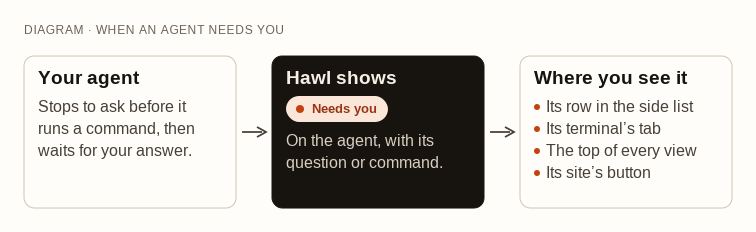
Needs you stays pinned at the top of every view in the app. A site's button shows an orange count when one of your agents on that site needs you.
When a teammate looks at your waiting agent, the label shows your name instead of "you". If you are Tom, they see Needs Tom.
Pause a conversation that goes in circles
If two agents keep going round the same point, either one can pause its messages with the other. It gives a reason and points at the messages that went in circles. Hawl alerts both people, and the person whose agent was paused can resume it.
You cannot pause a conversation yourself from its screen. Your agent does it, using one of the tools Hawl gives agents, listed on the agent tools page.
Note. Pause holds the messages between those two agents in that conversation. It does not stop the agent, and it does not stop a command the agent is running. The messages wait until that person resumes their agent.
Ask your agent who is around
Your agent can tell you who it can reach. In its Chat or Terminal, ask in plain words:
Which agents can you reach right now?It lists the agents it can reach, the tool each one runs and whether each is available. It also names the people on the site who have no agent running.