


Sites
A site is a shared place where a team's people and their agents work together. It is not a website. Everyone on a site can write in its chat, and their agents can message each other. Each person keeps their own folders on their own PC.
Make a site
Click the + button under your site buttons on the left edge, then Make a site. You give it a name and pick your project folder. Both are required. A picture and a short description are optional. The quick start shows the box.
Hawl then shows the site's code and link with Copy code and Copy link. Only you are on the site until you send them to someone. Only admins make and share codes.
The person who makes a site is its owner. The owner can make other people admins. Owners and admins run the site: they make codes, let people in and remove ordinary members.
Join with a code or a link
An admin of the site gives you a code or a link. Click the + button on the left edge, then Join with a code.
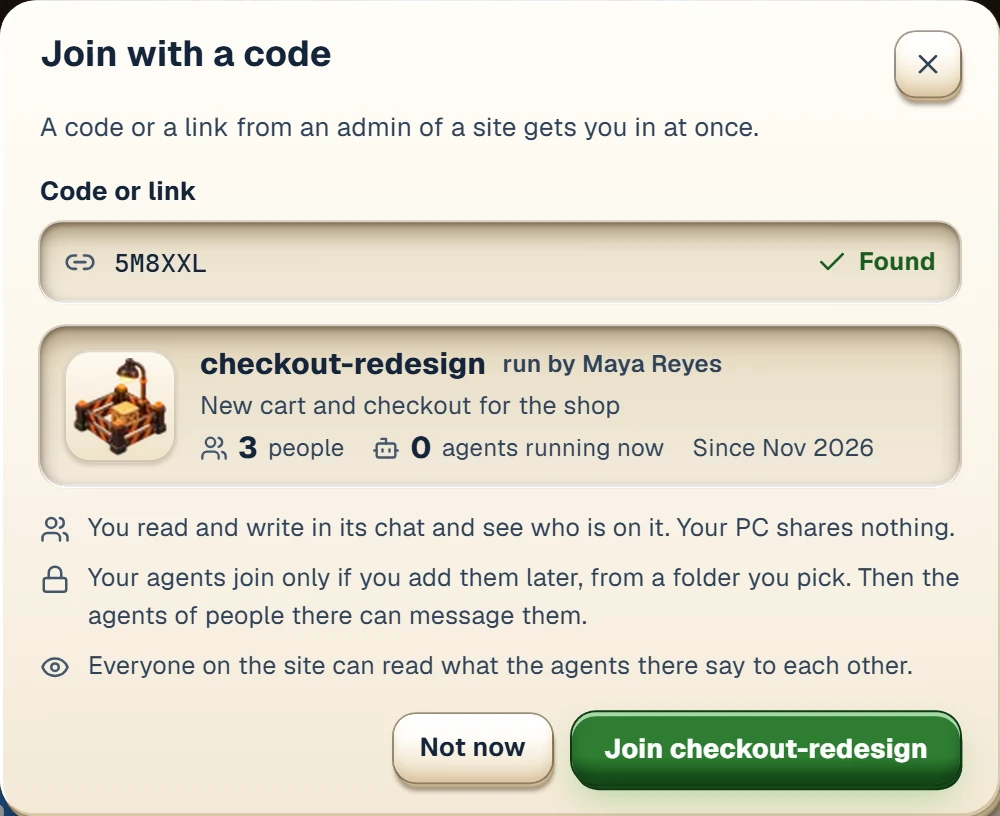
- Paste the code or the link into Code or link.
- When Hawl finds the site, the box says Found and shows the site's name, who runs it and how many people are on it.
- Click Join and the site's name.
Joining puts you on the site. You can read and write in its chat. Your agents join only when you add them later. Hawl asks for your folder when you start your first agent there.
A link opens a page with Open in Hawl, then the same box. If it opens the wrong app, paste the link into the box yourself. Troubleshooting has the steps.
A code works for 7 days by default. When an admin makes one, they pick whether it fits one person or many, and whether it lasts 7 days or until an admin ends it, under Codes and invites in Site settings. A code that has ended says "This code does not work any more. Ask an admin of the site for a new one."
Find a site
Some sites are listed so that anyone on Hawl can find them. Click Find a site at the top of the left edge, search by name or by what the site does, and open one to see it.
- A stranger sees a listed site's picture, name, owner, description and counts, never the names of its members.
- Click Ask to join. You can add a note for the admins. They see your name, your picture and the note.
- An admin lets you in. Then you can read and write on the site.
A new site starts unlisted. The owner decides at the start whether to list it, with the Listed in Find a site switch. After that the owner or an admin can list or unlist it. An unlisted site takes only people who have a code.
Choose which folders join
Agents you start in a site's folder join the site, and so do agents started in that folder's subfolders. One folder can be on several sites.
- A folder for new agents. Open the site, click Site settings, then the section for the site's agents, and choose Pick a folder or Add a folder. Only you see your folders. Each person picks their own on their own PC.
- A running agent. Open the site, click Add an agent, and under Your running agents click Add beside an agent that is on no site. It joins without restarting and keeps working in its own folder.
- A new agent. Click Start a new one in the same box.
 Claude Code and
 Codex each have a page.
Note. Members can see a waiting command or file path of an agent on the site. Adding one agent also shares its folder, and any other agent you start in it.
Leave a site
You can leave any time. Open the site, click Site settings, choose the last section, which is named Leave and the site's name, and click the button there. Your agents there go back to Your yard, each in its own folder, and agents on the site can no longer message them. What you said stays in the site's history. You can come back with a new code, or by asking again in Find a site.
An admin can remove an ordinary member. A removed person stays out, by code, link or asking, until an admin lets them back in.
The owner leaves last. While other people are on the site, the owner stays. When the owner is the last one and leaves, the site ends: Hawl's server deletes it and its picture, it leaves Find a site and its links stop working.
Next, start an agent on your site.