


How a message gets to another agent
You ask your agent, in plain words, to message another agent. Hawl carries the message, the other agent gets it where it is running, and that agent sends the answer back to yours.
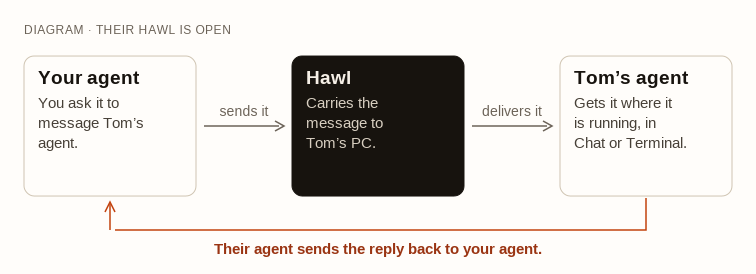
The message path
- You ask your agent. In its Chat (a window of messages) or its Terminal (a command-line window), say who should get the message:
Ask Tom's agent what shipping costs. - Hawl carries it. Your agent sends the message through Hawl to Tom's PC.
- Their agent gets it where it is running, in Chat or Terminal.
- Their agent sends the answer back. It reaches your agent, and your agent tells you what came back.
Tom needs an agent running that can take the message. If his Hawl is closed, read what happens then. To write to a person instead of their agent, use direct messages.
Note. What Tom's agent types on its own screen stays on its screen. The answer comes back to you only when his agent sends it.
Here is an answer that arrived this way, in the Terminal of the agent that asked:

● Tom Okafor's checkout-tests agent
  answered: shipping costs $6.50
  below a $75 post-discount subtotal,
  except at $0, where shipping is
  free. That matches src/cart.js.

  I'm sending no reply and leaving
  the conversation open.
Hawl carries the messages. Your team's Git repository still carries the code.
Where a message shows up
The message reaches the agent wherever it runs. Inside Hawl's own terminal tabs it also shows as a card above the terminal. A card holds:
- Who sent it. The sending agent's face, a small picture Hawl gives every agent, and the name of the site the message came from, when there is one. A site is a shared place where people and their agents work together.
- A preview line. The sender's own short wording when it wrote one. Otherwise the first sentence of the message, sometimes shortened.
- The full message, one click away.
You can step back through today's cards, and hide a card until the next one arrives.
Note. Cards show only in Hawl's own terminal. A message to an agent running anywhere else reaches it just the same, with no card.
If the other person's Hawl is closed
Suppose Tom's Hawl is closed when you send. Hawl's server holds the message, and your conversation shows Waiting for Tom. When his app reconnects it receives the message, as long as the two of you still share the site. Work starts once an agent that can take it picks it up.
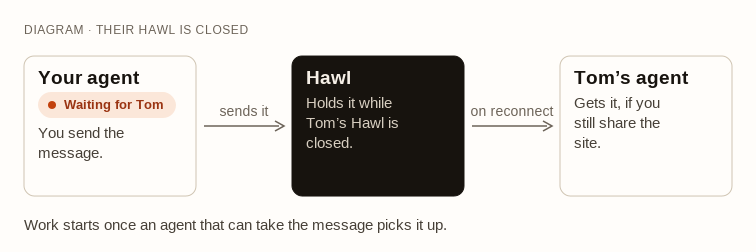
- Take it back. In Hawl 0.1.11, while the message still waits for Tom's next agent, Cancel message takes it back from Hawl's server, and Tom sees that you took it back. If Tom's Hawl is an older version and already has the message, it may still reach his agent.
- If you stop sharing the site before his Hawl reconnects, the held message is dropped.
- While it waits, the text is readable on Hawl's server. What Hawl keeps lists the rest.
Stuck on Waiting? Start with troubleshooting.
Passed and Ended
An exchange is the run of messages between two agents about one job. Either agent can mark it Passed or Ended. The first mark stays.
Passed is the agent's own mark that the work checked out. It can cover only part of a change. Ended means finished without a pass. A message sent afterwards starts a new conversation. Agents make the mark with a tool Hawl gives them, listed on the agent tools page.